How to add heart rate to your speedrun
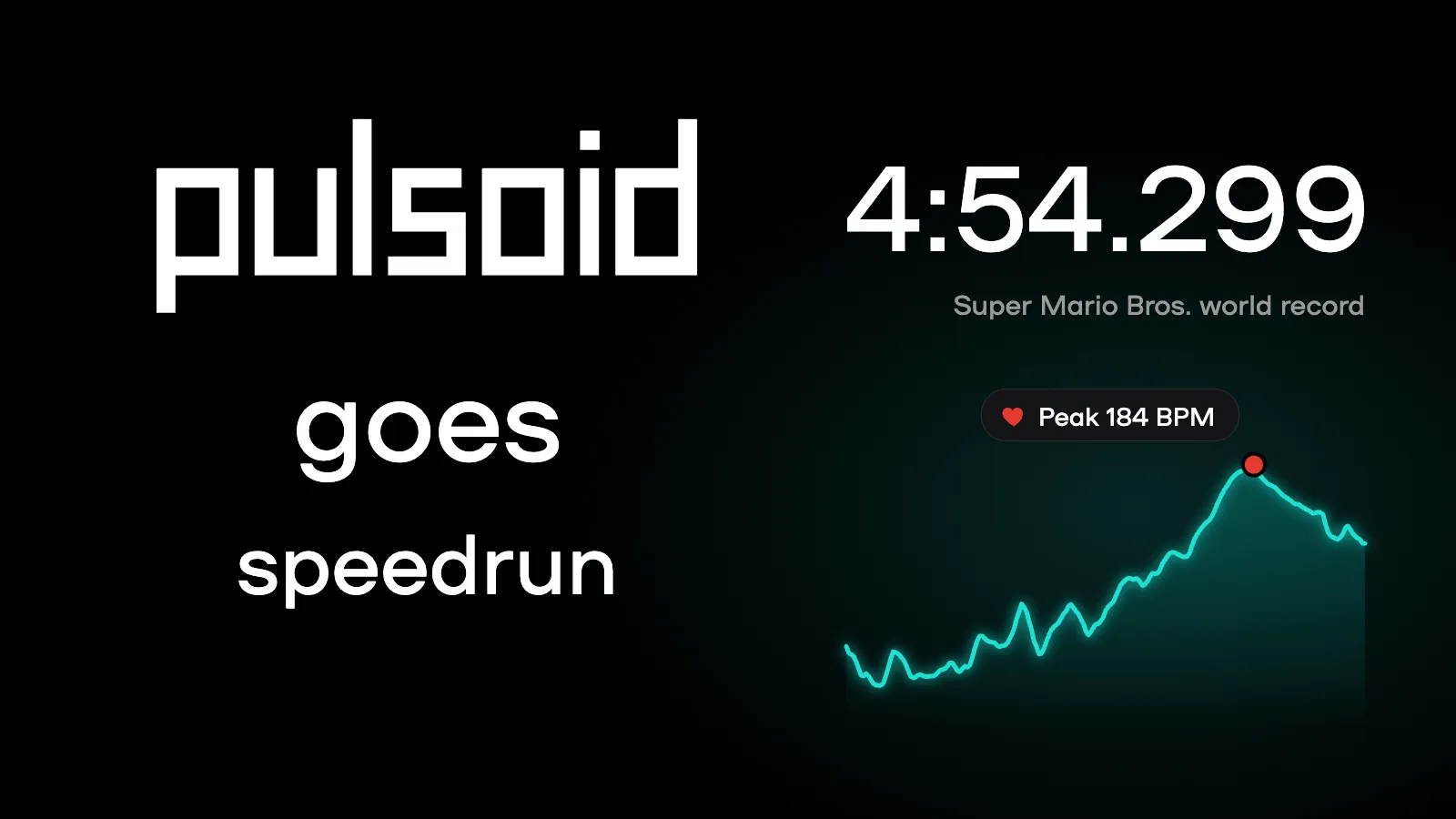
Speedrunning is all about nerves. The timer shows how fast you are, but your heart rate shows how it felt. When your BPM jumps on the last split of a good run, your viewers feel it too.
That’s why many famous speedruns had a heart rate monitor on screen. Even the current Super Mario Bros. world record holder, Niftski, streams with Pulsoid and shares his Pulsoid heart rate stats on speedrun.com.
In this guide, you’ll learn how to add your heart rate to your speedrun and how to share a heart rate report of your run with notes right on the graph.
Why add heart rate to your speedrun?
- Viewers see how nervous you are, not just how fast you are
- Every PB gets a story: you can see where you got nervous and where you kept it together
- You can compare your heart rate on resets and PBs, and learn how nerves affect your runs
- Your VODs and YouTube videos become more fun to watch
Famous speedruns with heart rate on screen
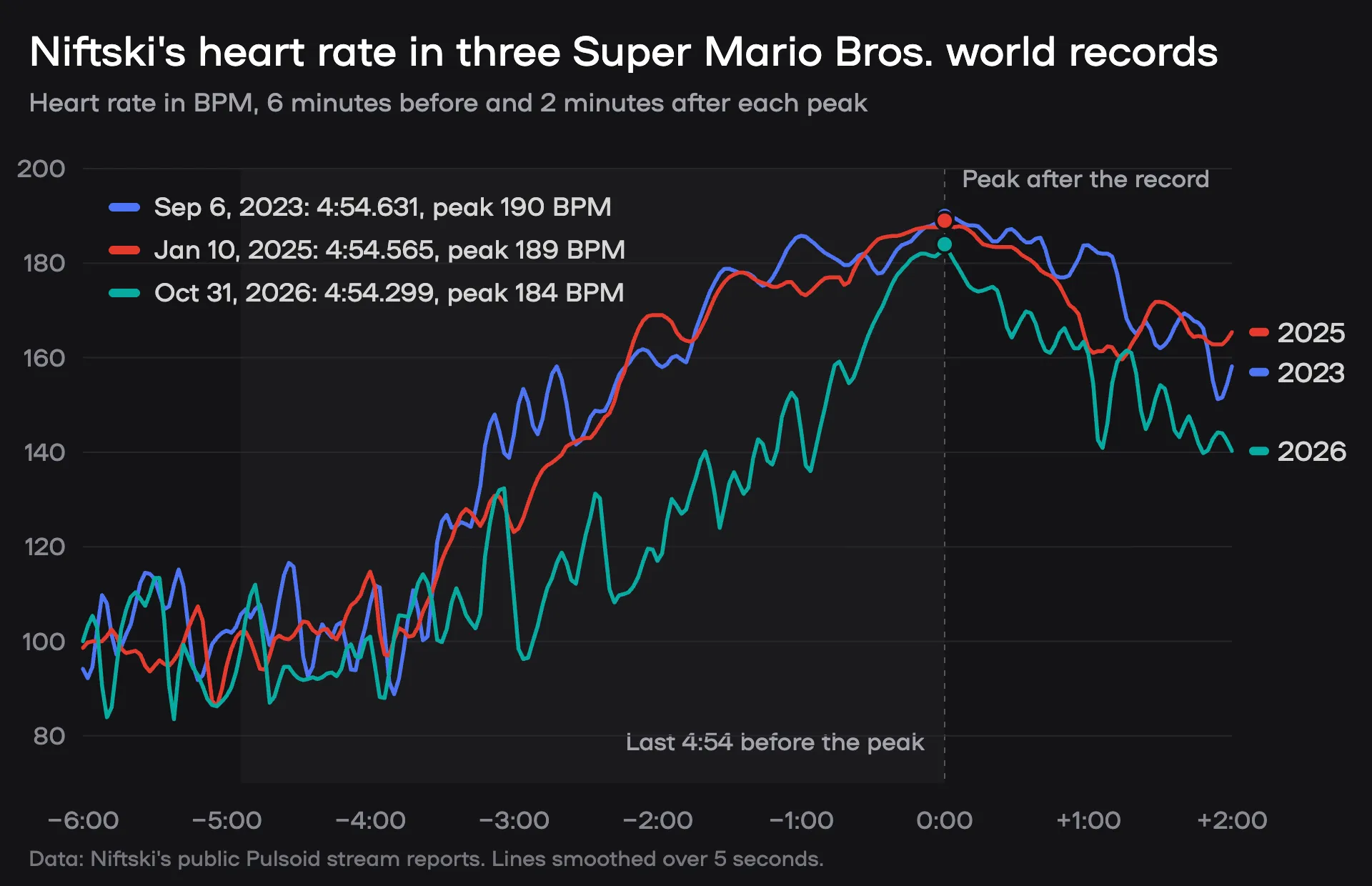
We looked at Niftski’s public Pulsoid stream reports from his last three world records. Every time, his heart rate goes up during the run and peaks right after he gets the record.
The 2026 run is different. For most of the run, his heart rate was 25 to 40 BPM lower than in 2023 and 2025, and it only caught up at the very end. In the last 4:54 before the peak, it averaged 124 BPM, compared to 147 BPM in 2023 and 144 BPM in 2025.
Niftski, Super Mario Bros. Any% in 4:54.299 (current world record)
On October 31, 2026, Niftski set a new Super Mario Bros. world record: 4:54.299. It’s the first run ever under 4:54.3.
He did it on a Halloween stream, dressed up as Mario. His viewers donated $1,000 for him to do a Mario impression for the whole stream, so he did the record run in character! He said the impression made him a lot less nervous, because he didn’t actually want to get the record while doing it. You can see it in his heart rate too: this was his calmest record run of the three.
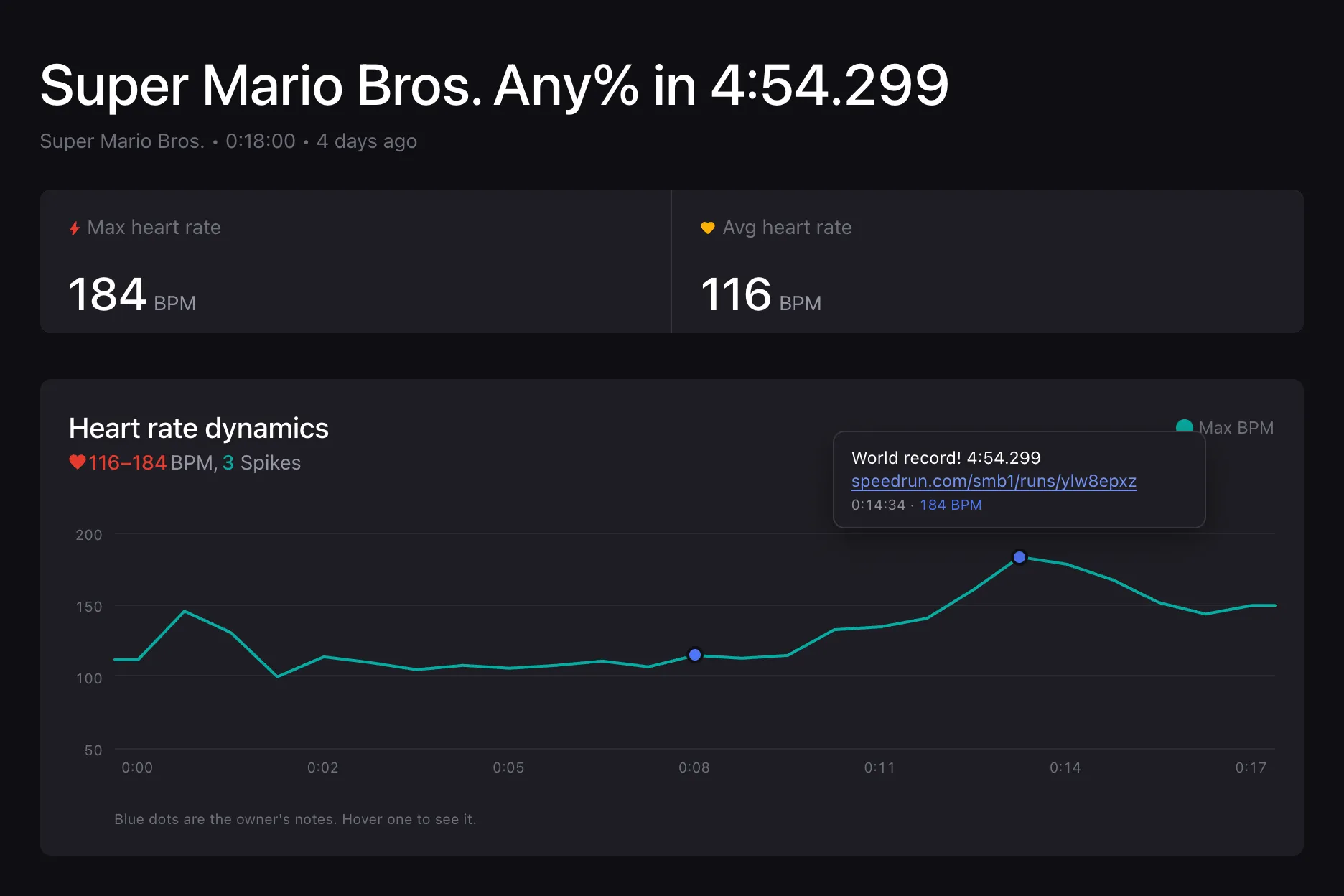
His Pulsoid stream report for that day shows a peak of 184 BPM.
- Run on speedrun.com: Any% in 4:54.299 by Niftski
- Leaderboard: Super Mario Bros. on speedrun.com
Niftski, Super Mario Bros. Any% in 4:54.565 (2025)
On January 10, 2025, Niftski got 4:54.565. That’s just 0.3 seconds away from a perfect run. His heart rate jumped to 188 BPM at the end. He later explained that his normal resting heart rate is about 70 BPM and that he is “completely healthy.” It’s just nerves: they can skyrocket on a run like this.
- Run on speedrun.com: Any% in 4:54.565 by Niftski
- Video: Super Mario Bros. Any% Speedrun in 4:54.565
- Heart rate: Pulsoid stream report, peak 189 BPM
Niftski, Super Mario Bros. Any% in 4:54.631 (2023)
On September 6, 2023, Niftski set a 4:54.631 world record. It was the first record with Lightning 4-2, a trick that saves the last bit of time that was left in this category. It was also the first run to reach the final level, 8-4, as fast as a perfect computer-assisted run (TAS). He was so happy that he apologized in his run notes for his “crazy popoff” after the run.
- Run on speedrun.com: Any% in 4:54.631 by Niftski
- Video: Super Mario Bros. Any% Speedrun in 4:54.631
- Heart rate: Pulsoid stream report, peak 190 BPM
darbian, Super Mario Bros. Any% in 4:57.627 (2015) and 4:57.260 (2016)
Before Niftski, darbian held the Super Mario Bros. record, and he had his heart rate on screen too. His speedrun.com note for his 4:57.627 record from October 2015 simply says: “The number in the bottom left is heart rate.” In April 2016, he got 4:57.260, and his heart rate went up to about 170 BPM at the end.
- Run on speedrun.com: Any% in 4:57.627 by darbian
- Run on speedrun.com: Any% in 4:57.260 by darbian
Cheese, Super Mario 64 120 Star in 1:40:05 (2017)
On April 1, 2017, Cheese set a Super Mario 64 world record for collecting all 120 stars: 1:40:05. His heart rate went just over 130 BPM, while his own Twitch chat tried to distract him with text-to-speech messages. A month later, he became the first person to finish 120 Star in under 1 hour 40 minutes, with 1:39:57.
- Run on speedrun.com: 120 Star in 1:40:05 by Cheese
- Run on speedrun.com: 120 Star in 1:39:57 by Cheese
- Leaderboard: Super Mario 64 on speedrun.com
More world records to watch
Here are some current world records from popular games, as of November 4, 2026. Imagine them with a heart rate graph next to the timer! Click a time to watch the run on speedrun.com.
| Game and category | Runner | Time |
|---|---|---|
| Super Mario Bros. Any% | Niftski | 4:54.299 |
| Super Mario 64 120 Star | Suigi | 1:35:14 |
| Super Mario 64 16 Star | Suigi | 14:32.870 |
| Celeste Any% | secureaccount | 24:44.083 |
| Portal Inbounds | SiDiouS | 7:13.425 |
Why Pulsoid?
- The current Super Mario Bros. world record holder uses it and shares his Pulsoid stats on speedrun.com
- It works with chest straps, armbands, Apple Watch, Wear OS, Garmin, and many other devices, on iPhone, Android, and Windows
- There are lots of widgets to choose from, like a simple BPM number, a real-time heart rate graph, or a speedometer
- Session reports let you share the heart rate of your run with notes right on the graph
- It’s free to start
How to add heart rate to your speedrun
What you need
- A heart rate monitor. We recommend a chest strap, because it shows changes in your heart rate right away. Here’s our list of heart rate monitors that work best with Pulsoid
- The free Pulsoid app for iPhone, Android, or Windows
- A free Pulsoid account
- OBS, Streamlabs, or any other streaming software
Set it up
- Put on your heart rate monitor and select it in the Pulsoid app. When you see your BPM in the app, you’re connected
- Pick a widget in the widget library. A simple BPM number or a heart rate graph works great for speedruns
- Set up BPM color ranges, so the widget changes color when your heart rate goes up
- Copy your widget URL and add it as a Browser Source in OBS, Streamlabs, or other streaming software
- Put the widget next to your timer, so viewers can see your time and heart rate together. Try not to cover the game
- That’s it! Start your runs, and your heart rate will show up on stream and in your recordings
Tip: Streaming straight from a PS4 or PS5 without a PC? Use the Pulsoid Twitch Extension to show your heart rate on Twitch.
Share the heart rate of your run with a session report
Pulsoid also makes session reports from your heart rate, even when you’re not streaming. A report shows your max and average BPM, heart rate spikes, calories, intensity, and a graph of the whole session. You can turn it into a page about your run and share it with a link.
- Open Reports and go to the Sessions tab
- Open the session with your run
- Under Timing, click Adjust to cut the report down to your run. You can also keep the whole session to show the grind
- Click the title to rename your report, for example “New PB: Any% in 4:58.123”. Then click “Add activities” to add your game and category (up to 5)
- Add pins to the moments that matter. Click the graph where something happened, write a short note (up to 100 characters), and add an image if you want, like a screenshot of your splits. You can also add links, like your VOD or your speedrun.com run
Note: With the “Bars + zoom” graph, click a bar on the top chart first to zoom in. Then click a bar on the bottom chart to add a pin.
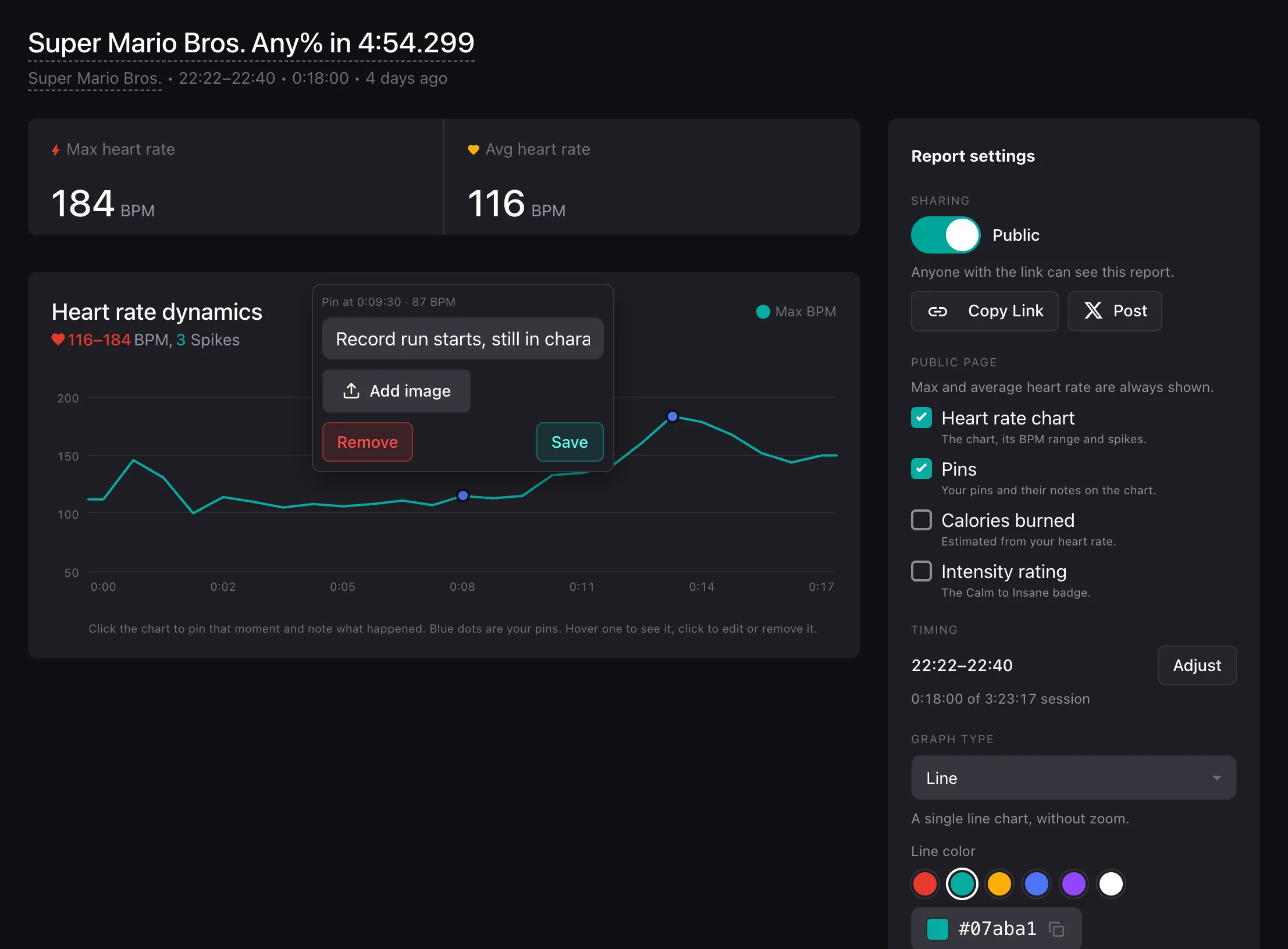
- Under Graph type, choose Bars + zoom, Line, Area, or HR zones. For Line and Area, you can also pick a color
- Add a banner and your Twitch, YouTube, and X links. You can add one more link too, like your speedrun.com profile
- Under Public page, choose what people can see: the heart rate chart, your pins, calories, and intensity. Max and average heart rate are always shown
- Under Sharing, turn on Public. Then click Copy Link, or click Post to share it on X
Here’s what your viewers will see. They can hover over or tap a pin to read your note:
Pin ideas for your run
- “Entered 8-4 on world record pace”
- “Missed the trick, saved it on the next room”
- “Final split, 2 frames ahead of PB”
- “PB! speedrun.com/your-run-link”
Add your report to speedrun.com
When you submit your run on speedrun.com, paste your report link into the run description, next to your video. Niftski does the same thing with his world record runs. You can also share the link in your YouTube description, on Discord, or when you post about your new PB.
Tip: If you stream on Twitch, Pulsoid also makes a stream report for every stream, with your VOD and automated clips.
More ways to use heart rate on speedrun streams
- Turn on Automated Clips to catch your reaction every time your heart rate spikes, like when you get a new PB
- Use Stream Markers to easily find your best runs in a long VOD
- Running a speedrun marathon, race, or charity event? Check out the Pulsoid Fund
Tips for accurate readings
- Use a chest strap if you can. Smartwatches and wrist trackers can be a bit slow to show sudden spikes. Here are some tips for using a chest strap
- Put on your monitor a few minutes before your first run
- Keep your phone or PC close to you, since your heart rate is sent over Bluetooth
You’re all set! Go for that PB, and let your viewers feel every split with you.
If you run into any issues, reach out to us on Discord or email us at support@pulsoid.net
FAQ
How do I show my heart rate during a speedrun?
Connect a heart rate monitor to the free Pulsoid app, pick a widget, and add it as a browser source in OBS, Streamlabs, or any other streaming software. Put it next to your timer, and your viewers will see your heart rate live.
What is the best heart rate monitor for speedrunning?
A chest strap. It shows changes in your heart rate right away. Smartwatches and wrist trackers work too, but they can be a bit slow. Check out our list of heart rate monitors that work best with Pulsoid.
How do I add my heart rate to a speedrun.com submission?
Open your session report in Pulsoid Reports, make it Public, and click Copy Link. Then paste the link into your run description on speedrun.com.
Can I add notes to my heart rate graph?
Yes. Click the graph in your session report to add a pin. A pin can have a short note, a link, and an image.
Do I need to stream to get a heart rate report of my run?
No. Pulsoid makes session reports from your heart rate, even when you’re not live. If you stream on Twitch, you also get a stream report for every stream.
Can I show my heart rate on a console speedrun?
Yes. If you capture your console in OBS, add the Pulsoid widget as a browser source, just like on PC. If you stream straight from a PS4 or PS5, use the Pulsoid Twitch Extension.
Is a heart rate overlay allowed on speedrun.com?
Each game on speedrun.com has its own rules for videos. Check the rules for your game, and keep the widget away from the game and the timer.
Where can I get help?
If you run into any issues, reach out to us on Discord or email us at support@pulsoid.net